Arduino, Blinking LEDs and the Joy of Tiny Victories
In web development, a successful day might end with "the API now returns a slightly different JSON." In embedded programming, a successful day ends with a light turning on. A real, physical light, in the real world, because of code you wrote. It never stops feeling like magic.
The "Hello, World" of hardware
const int LED_PIN = 13;

void setup() {
  pinMode(LED_PIN, OUTPUT);
}

void loop() {
  digitalWrite(LED_PIN, HIGH);
  delay(500);
  digitalWrite(LED_PIN, LOW);
  delay(500);
}
Two functions. setup() runs once when the board powers on. loop() runs forever, like a very committed employee. Pin 13 on most Arduino Uno boards has a built-in LED, so you don't even need to buy anything else.
Upload it. The light blinks. You will smile. Everyone does.
Why delay() becomes your enemy
delay(500) freezes the whole board for half a second. That's fine for one LED. The moment you want to blink an LED and read a button, the button gets ignored while the board is asleep. The grown-up pattern is to check the clock instead of sleeping:
const int LED_PIN = 13;
unsigned long lastToggle = 0;
bool ledOn = false;

void setup() {
  pinMode(LED_PIN, OUTPUT);
}

void loop() {
  unsigned long now = millis();
  if (now - lastToggle >= 500) {
    ledOn = !ledOn;
    digitalWrite(LED_PIN, ledOn ? HIGH : LOW);
    lastToggle = now;
  }
  // free to read buttons, sensors, etc. here
}
This "non-blocking" style is the first big mental shift in embedded programming, and it's the same idea behind event loops in JavaScript and async code in Python. Hardware teaches you software.
Dimming with PWM
Digital pins are either on (5 V) or off (0 V). So how do you make an LED half bright? You cheat: switch it on and off hundreds of times per second. Your eyes average it out.
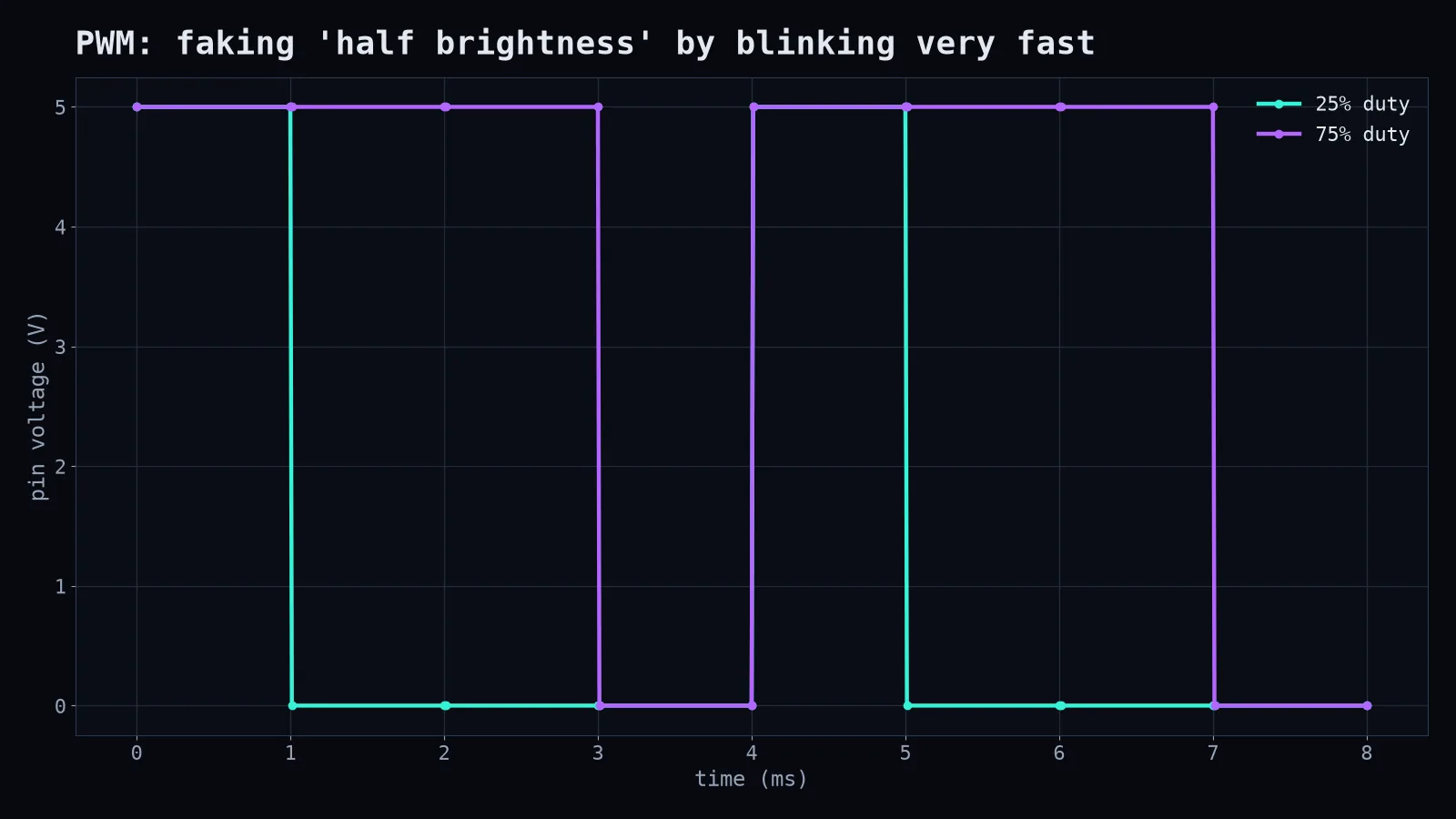
analogWrite(9, 64); // ~25% brightness on a PWM pinThe fraction of time the pin is on is called the duty cycle. The same trick controls motor speed, fan speed and the brightness of your phone screen.
Tiny victories, real lessons
Arduino teaches things that are easy to ignore on a laptop with 16 GB of RAM:
- Memory is precious. An Uno has 2 KB of RAM. Two kilobytes. A long string can be a problem.
- Timing is everything. Microseconds matter when you're talking to sensors.
- The real world is noisy. Buttons "bounce" and register five presses for one push. You learn to debounce, which is also a useful skill for handling users.
Where to go next
Read a temperature sensor and print it to the Serial Monitor. Then show it on a small display. Then send it over Wi-Fi with an ESP32. Then, without noticing, you'll have built an IoT device, which is just an Arduino that sends emails.
Start with the blinking light. Celebrate it properly. In a world of abstractions, there's something deeply honest about code that makes a thing in front of you change.