Choosing a Database, and How to Scale It
Every few months someone asks me, with the face of a person about to make an irreversible decision: "Which database should we use?" Then, before I can answer, the second question arrives: "And how do we make sure it scales?"
Here is the short version of my answer to both: pick the boring one, measure before you panic, and scale in the order of cheapest-first. The long version is below, with fewer opinions than a conference talk and more diagrams than a textbook.
First, ask what your data actually does
Nobody should choose a database by popularity, by what a famous company uses, or by what looks good on a CV. Choose by how your application touches the data. Five questions get you most of the way:
- What is the shape of the data? Rows and relationships (users, orders, invoices)? Free-form documents? Events arriving in a stream? A graph of connections?
- What are the access patterns? Look up one thing by key? Join six tables? Scan a billion rows to compute an average?
- Read-heavy or write-heavy? A blog is 99% reads. A sensor network is 99% writes.
- How correct must it be? If a lost write means a lost payment, you want transactions. If a lost write means a slightly stale "like" count, you have options.
- How big, really? Not "how big do we hope to be", but how big will it be in the next 12 to 18 months?
If you can answer those on a napkin, you can pick a database. If you can't, you are not choosing a database yet. You are choosing a guess.
The families, in one honest paragraph each
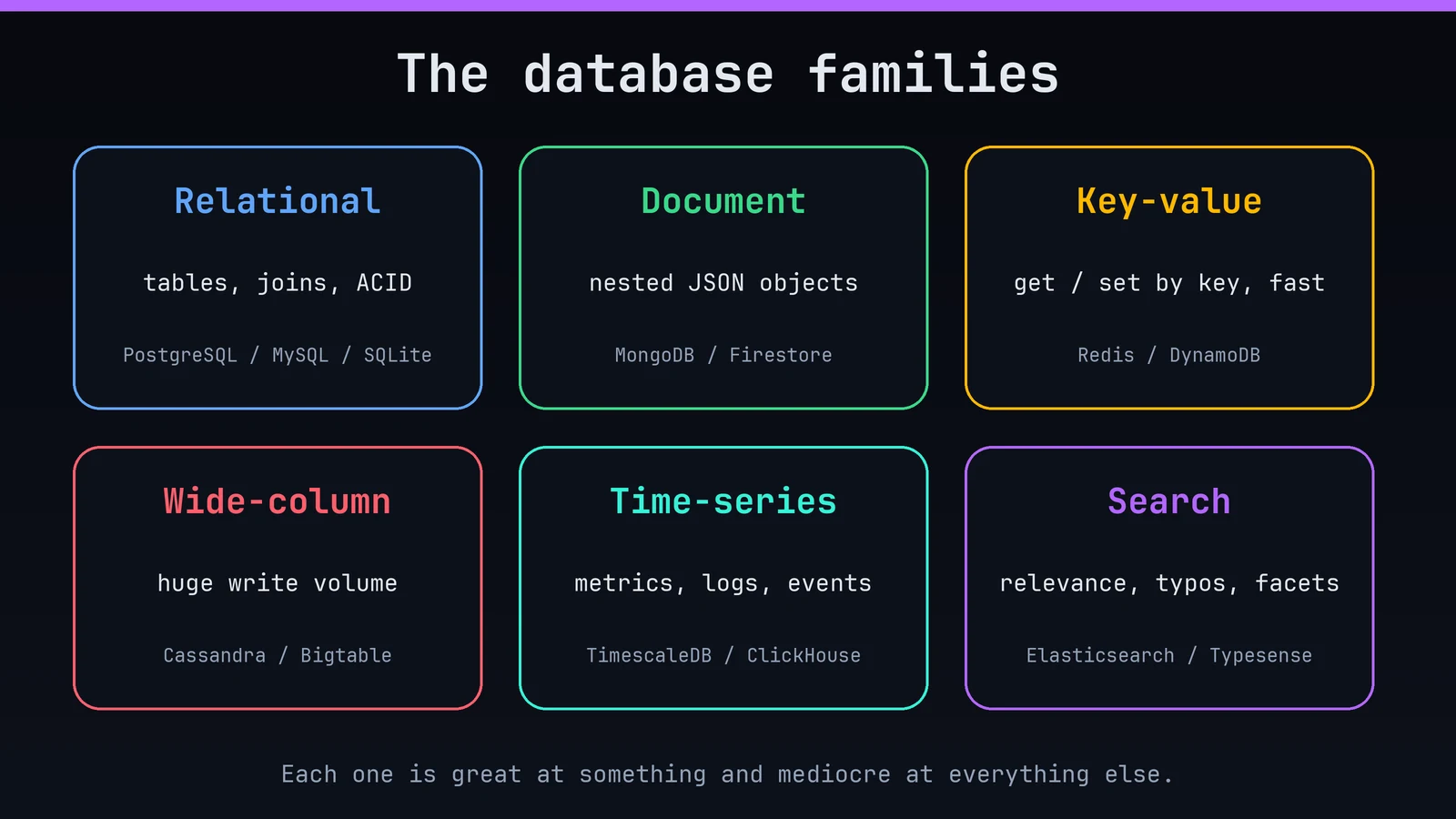
Relational (PostgreSQL, MySQL, SQLite). Tables, rows, joins, constraints and ACID transactions. The data has structure, the structure has rules, and the database enforces the rules for you. Decades of tooling, a query language everyone knows, and enough flexibility (JSON columns, full-text search, extensions) to cover far more than people expect. This is the right default for most applications.
Document (MongoDB, Firestore, CouchDB). Store whole nested objects as one unit. Excellent when records are self-contained and the schema changes often, and when you mostly read or write one document at a time. It gets awkward when you need many cross-document relationships and reports.
Key-value (Redis, DynamoDB, Memcached). Give it a key, get back a value, extremely quickly. Perfect for sessions, caches, counters, queues and leaderboards. Not where you want to ask clever questions about your data.
Wide-column (Cassandra, ScyllaDB, Bigtable). Built for enormous write volumes spread across many machines, with queries designed up front around a partition key. Superb at huge scale, and unforgiving if your access patterns change.
Time-series (TimescaleDB, InfluxDB, ClickHouse for analytics). Metrics, logs and sensor readings: append-mostly, queried by time range, aggregated and downsampled. Specialised storage makes these workloads dramatically cheaper and faster.
Search (Elasticsearch, OpenSearch, Typesense, Meilisearch). Full-text relevance, typo tolerance, faceting. Usually a secondary copy of data that lives somewhere else.
Graph (Neo4j and friends). When the relationships are the question: "friends of friends who also bought this", fraud rings, recommendation paths. Powerful, and rarely your primary store.
A decision flow that fits on one screen
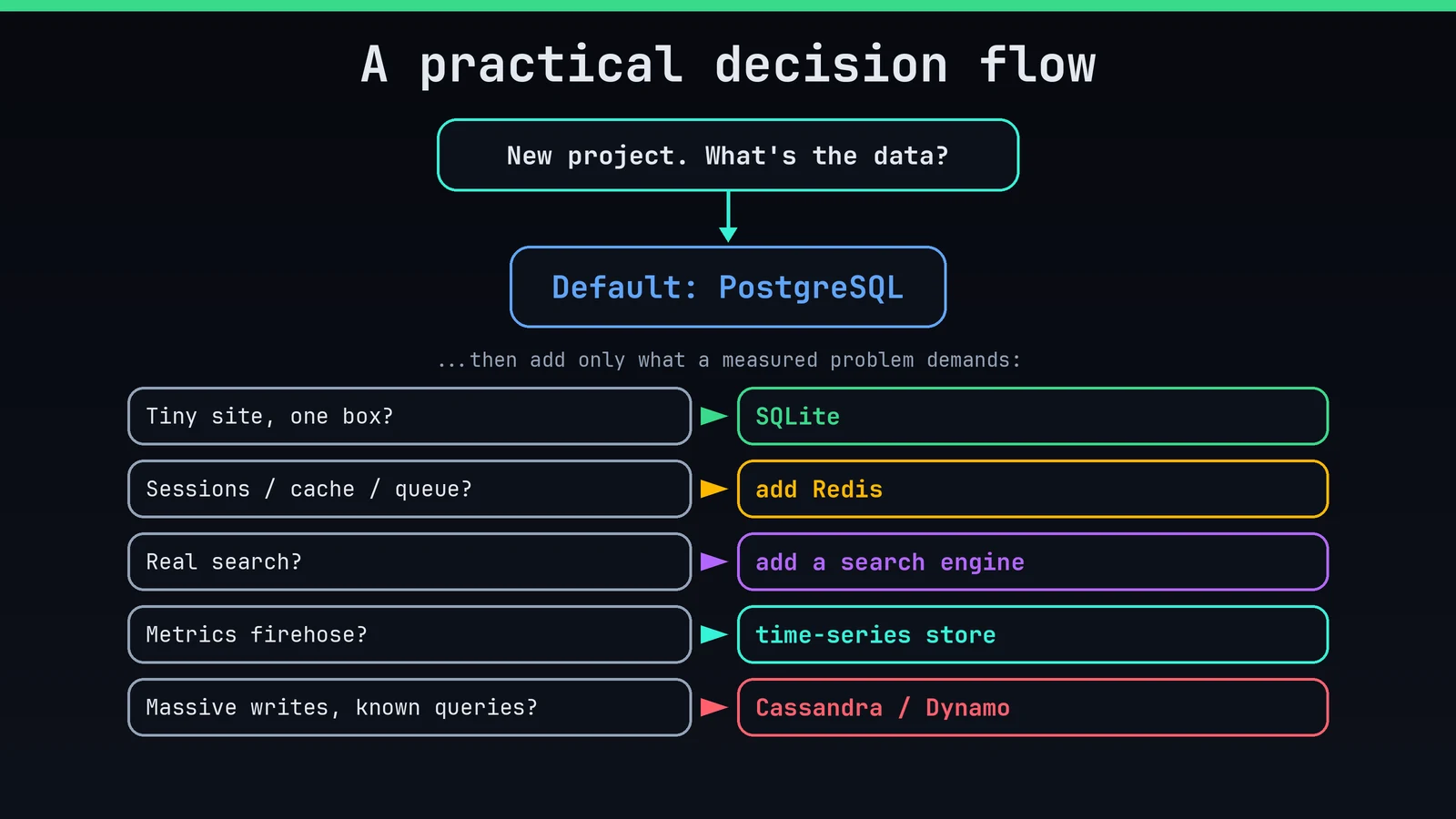
If I squint at all the projects I have seen, the flow looks like this:
- Default to PostgreSQL. Transactions, relations, JSON when you need it, great tooling, available everywhere.
- Small app, single server, mostly reads, no heavy concurrent writes? SQLite is genuinely a production-grade choice. (This very blog runs on it. It's fast, it's one file, and it has never once paged me at 3 a.m.)
- Need a cache, rate limiter, queue or session store? Add Redis next to your main database. Not instead of it.
- Need relevance-ranked search? Add a search engine as a derived copy, fed from the main database.
- Metrics or event firehose? A time-series or columnar analytics store.
- Truly massive write throughput with simple, known access patterns? Now we can talk about Cassandra or DynamoDB.
Notice what's missing: "because it's web scale". That joke has been around for years, and it's still correct.
Things that quietly decide the outcome
Your team's skills. A database the whole team understands, in production, at 2 a.m., beats a theoretically better one nobody has operated. Operational knowledge is a feature.
Managed vs self-hosted. Running a database yourself means backups, upgrades, failover, monitoring and security patches, forever. A managed service costs more per month and far less in weekends. For most teams, managed wins until the bill becomes embarrassing.
Consistency model. Many distributed databases trade strict consistency for availability and speed ("eventual consistency"). That's a fine trade when you've thought about it. It's a nasty surprise when you discover it after a customer sees an order disappear and come back.
Lock-in and exit cost. Standard SQL and open-source engines are easy to move. A proprietary API tied to one cloud is a marriage. Know which one you're signing.
Polyglot, but late. Using the right store for each job is healthy, and every extra database is another thing to back up, monitor and understand. Add them one at a time, when a measured problem demands it.
Now, scaling. The ladder.
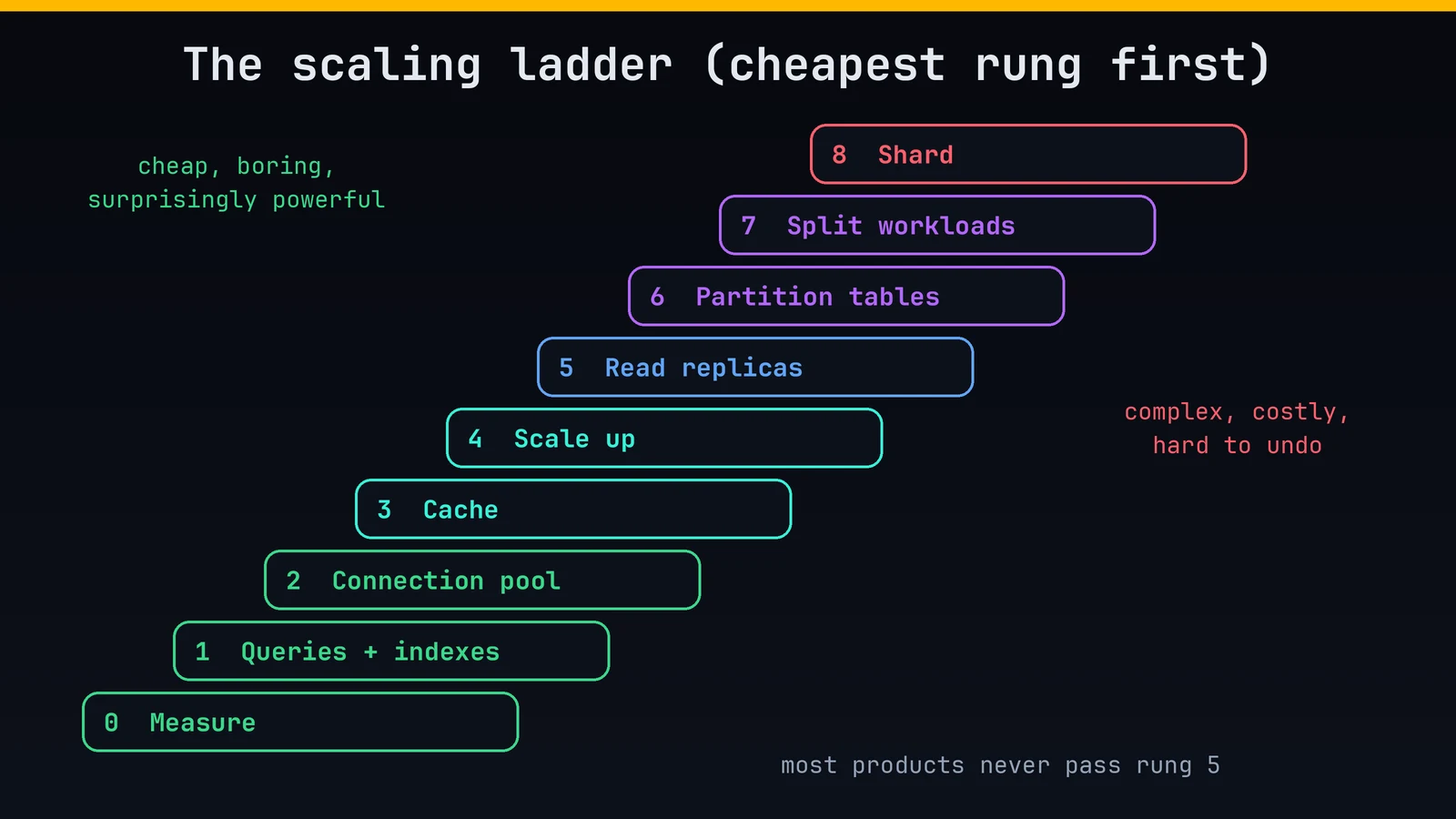
Here is the part most people get backwards: they jump to the top of the ladder, sharding and distributed clusters, when they should start at the bottom, where each rung is cheap, boring and surprisingly powerful.
Rung 0: Measure
You cannot fix what you haven't looked at. Turn on slow-query logging. Look at the query plan (EXPLAIN ANALYZE in PostgreSQL). Watch CPU, memory, disk I/O, connection count, cache hit ratio and the 95th/99th percentile latency, not just the average. Most "we need to scale the database" conversations end here, because the real problem is one query.
Rung 1: Fix the queries and the indexes
This is where the largest gains usually live.
- Add the missing index. A query that scans ten million rows can become a query that reads twenty.
- Remove the unused index. Every index slows writes and takes space.
- Kill the N+1 pattern: one query for the list, then one more per item. Fetch in bulk.
- Select only the columns you need. Paginate with keyset pagination (
WHERE id > last_seen ... LIMIT 50) instead of deepOFFSET. - Don't run analytical reports against your live transaction tables at noon.
Rung 2: Pool the connections
Databases are surprisingly bad at holding thousands of open connections. Put a connection pooler in front (PgBouncer for PostgreSQL, or your driver's built-in pool) and reuse a small number of real connections. This alone rescues a lot of "the database fell over" incidents that were really "the app opened too many connections" incidents.
Rung 3: Cache
The fastest query is the one you don't run. Put hot, read-heavy, slowly-changing data in Redis, in memory, or at the CDN. Two cautions, because caches bite:
- Invalidation is the hard part. Decide up front: expire by time (simple, a bit stale), or invalidate on write (fresher, more code).
- Protect against the stampede. When a hot key expires and a thousand requests miss at once, they all hit the database together. Use short locks, jittered expiry, or serve-stale-while-revalidating.
Rung 4: Scale up (vertical)
More CPU, more RAM, faster NVMe disks. It feels unglamorous and it works astonishingly well, because modern single machines are enormous, and a single well-tuned PostgreSQL instance can serve a very large product. Buying a bigger box for a few hundred pounds a month often costs less than the engineer-months spent avoiding it.
Rung 5: Read replicas
Most applications read far more than they write. Add one or more copies that follow the primary and send read traffic to them. Writes still go to one place.
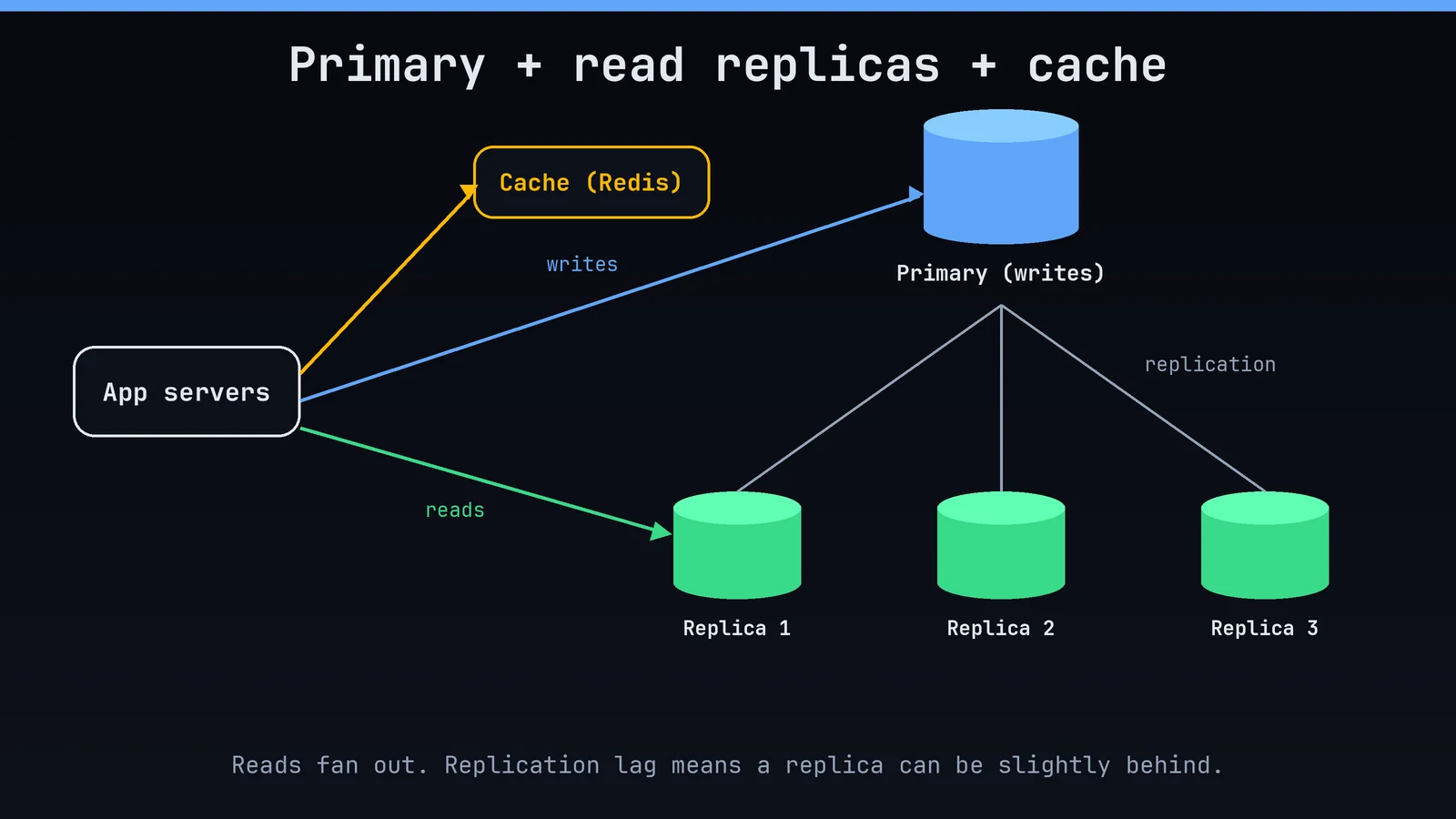
The catch is replication lag: a replica may be a few milliseconds (or seconds) behind. A user saves their profile, reloads, and sees the old one. Fixes: read from the primary right after a write ("read your own writes"), or route that user's session to the primary for a short window.
Rung 6: Partition (split big tables)
When a single table gets huge (hundreds of millions of rows or more), split it inside one database, typically by time or by tenant. Queries that touch recent data scan a small partition; old partitions can be archived or dropped cheaply. Often this is all the "sharding" a product ever needs.
Rung 7: Separate workloads
Move the heavy stuff out of the way of the user-facing path.
- Analytics and reporting go to a replica or a columnar warehouse.
- Search goes to a search engine.
- Background work goes through a queue, so a spike becomes a backlog instead of an outage.
- Archive cold data to cheaper storage.
Rung 8: Shard (horizontal partitioning across machines)
Only when one primary can no longer take your write volume or fit your data do you split the data across independent database servers, each owning a slice, chosen by a shard key such as user ID or tenant ID.
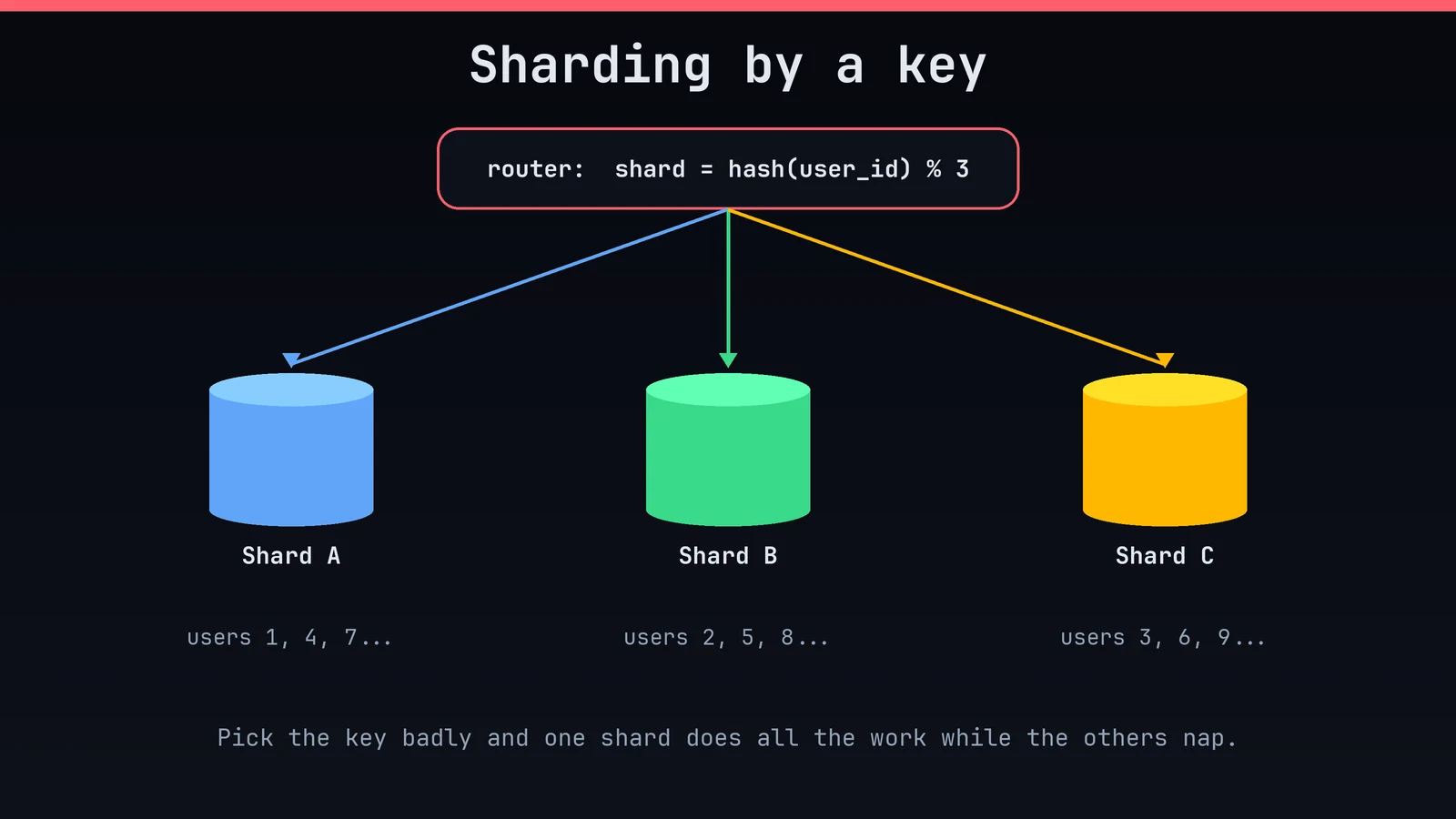
This is the point of no easy return, so respect it:
- The shard key is the whole game. A bad key creates a "hot shard" that does all the work while the others nap.
- Cross-shard joins and transactions become hard or impossible. Your application now carries logic that the database used to carry.
- Resharding is painful. Adding a shard means moving data while the system is live.
- Operations multiply. Backups, migrations and monitoring are now times N.
If you get here, consider distributed SQL systems (such as CockroachDB, YugabyteDB or Vitess in front of MySQL) or a database designed for horizontal scale from the start, before hand-rolling your own sharding layer.
A few ideas worth carrying around
Latency vs. throughput. Making each request faster and handling more requests at once are different problems with different fixes. Know which you have.
Availability is not scale. Replicas and failover keep you up. They don't automatically make you faster. Plan for both, separately.
Back up, then test the restore. A backup you have never restored is a hope, not a backup.
Load test with realistic data. A database with a thousand rows behaves nothing like one with a hundred million. Test with production-sized data and production-shaped queries before launch, not after.
Design for deletion and growth. Decide early how data ages out. Unbounded tables are time bombs with a long fuse.
The one-page cheat sheet
- New app, unsure: PostgreSQL
- Small site, one server: SQLite (seriously)
- Sessions, caching, rate limits: Redis
- Flexible nested records: A document store, or PostgreSQL
jsonb - Full-text search: A search engine, as a derived copy
- Metrics and logs: Time-series or columnar store
- Millions of writes per second, known queries: Cassandra / DynamoDB-style
- Slow queries: Indexes and query plans, before anything else
- Too many connections: A pooler
- Read-heavy load: Cache, then read replicas
- One enormous table: Partitioning
- Writes outgrow one primary: Sharding, last
The bottom line
Choose a database for the problem you have, with room for the one you can see coming, and not for the one in a conference slide. Start with something boring and well understood. Keep your data model clean. Measure, then climb the ladder one rung at a time, because every rung you skip is complexity you pay for forever and may never have needed.
Most products never need to leave the first five rungs. The ones that do will know exactly why, because they measured.
Disagree? Using something wonderfully strange in production? Tell me in the comments. I'm collecting war stories.